Advanced Accounting Guide 1/8 — System Overview
An introduction to KIRA's Advanced Accounting: a complete double-entry system built on top of your rental operations, with a chart of accounts, balanced journal entries, and standard financial reports trusted by accountants and auditors.
📚 Advanced Accounting Guide — Part 1 of 8 · Stage: Orientation · Full series map below ⬇
🗺 Guide Map — the Accounting Work Cycle in 8 Parts
This series follows the accounting work cycle as you actually live it: foundation, setup, daily work and review, and finally the year-end close. Read the parts in order — each article leads you to the next.

Stage One — Orientation:
- System Overview — you are here
- Getting Started
Stage Two — Setup & Foundation:
Stage Three — Daily Work & Review:
- Creating & Managing Journal Entries
- Trial Balance & Income Statement
- Balance Sheet & Account Statement
Stage Four — Year-End:
As a car-rental company grows, tracking daily cash alone is no longer enough: auditors ask for certified financial statements, accountants need a proper ledger, and owners want an accurate picture of profits and obligations — not just cash movement. This is what Advanced Accounting in KIRA delivers: a complete double-entry system built directly on top of your daily operations — contracts, payments, maintenance, fines, and bank transfers.
This article gives you an overview of the system: how it differs from Simplified Accounting, the principles it is built on, its components, and who it is for. It is the first article in a full series covering each component in detail.
Simplified vs. Advanced Accounting
KIRA offers two levels of financial work, each with a clear purpose:
- Simplified Accounting (financial operations / cash box): records one-way cash movement — income or expense — ideal for quick daily follow-up.
- Advanced Accounting: builds a full general ledger with a chart of accounts, balanced journal entries, and standard reports (trial balance, income statement, balance sheet, account statement) trusted by accountants and auditors.
The two do not replace each other — you can use both together: Simplified for daily operational tracking, Advanced for the official books and reports.
The Golden Rule: Every Entry Is Balanced
The entire system rests on one rule with no exceptions: in every journal entry, total debits equal total credits. For example, when collecting a 100 OMR payment on a rental contract, 100 OMR is recorded on the debit side (the account receiving the money) and 100 OMR on the credit side (rental revenue) — keeping the books fully balanced.
The system enforces this automatically: it refuses to save or post any unbalanced entry, so your report figures can never drift because of a one-sided entry.
Entry Lifecycle: From Draft to Posted
Every journal entry passes through two clear stages — the foundation of trustworthy numbers:
- Draft: freely editable and deletable. Review and adjust it as needed — it does not affect any report yet.
- Posted: final and included in reports; it can no longer be edited or deleted. If you discover a mistake in a posted entry, you correct it with a reversing entry — keeping your books' history complete and auditable.
Remember the companion rule: reports are built from posted entries only — drafts never appear in any report.
System Components
All pages live under: Finance ← Advanced Accounting. The main components:
Chart of Accounts
The structure that classifies all of your company's money: assets, liabilities, equity, revenue, and expenses. KIRA ships a ready-made template designed for the car-rental industry, and you can add custom accounts to match your business.
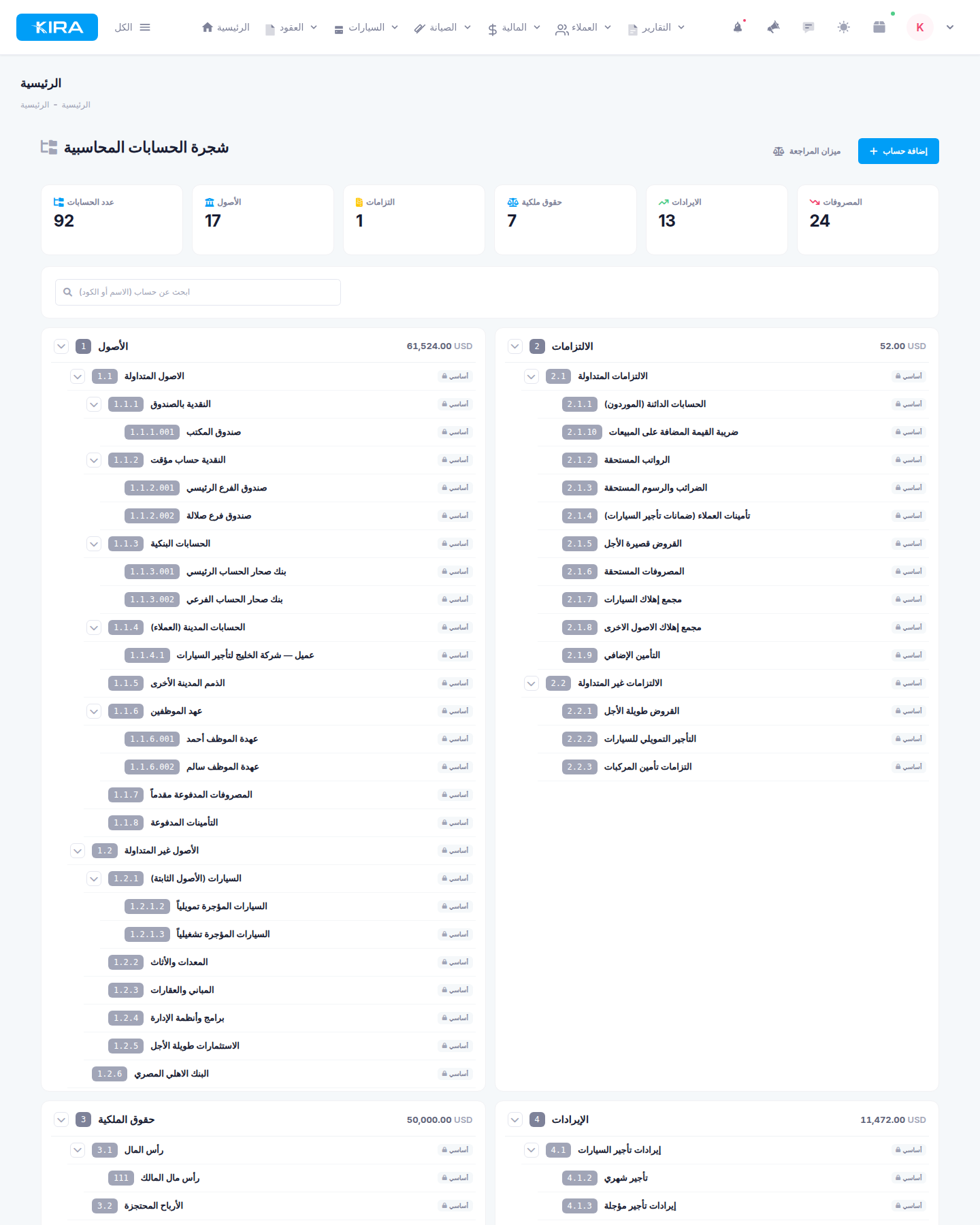
The chart of accounts with its five sections and account counters.
Journal Entries
The record of every financial movement in your books. You can create manual entries yourself, and the system can also generate automatic entries from your operations — reducing errors and data-entry time.
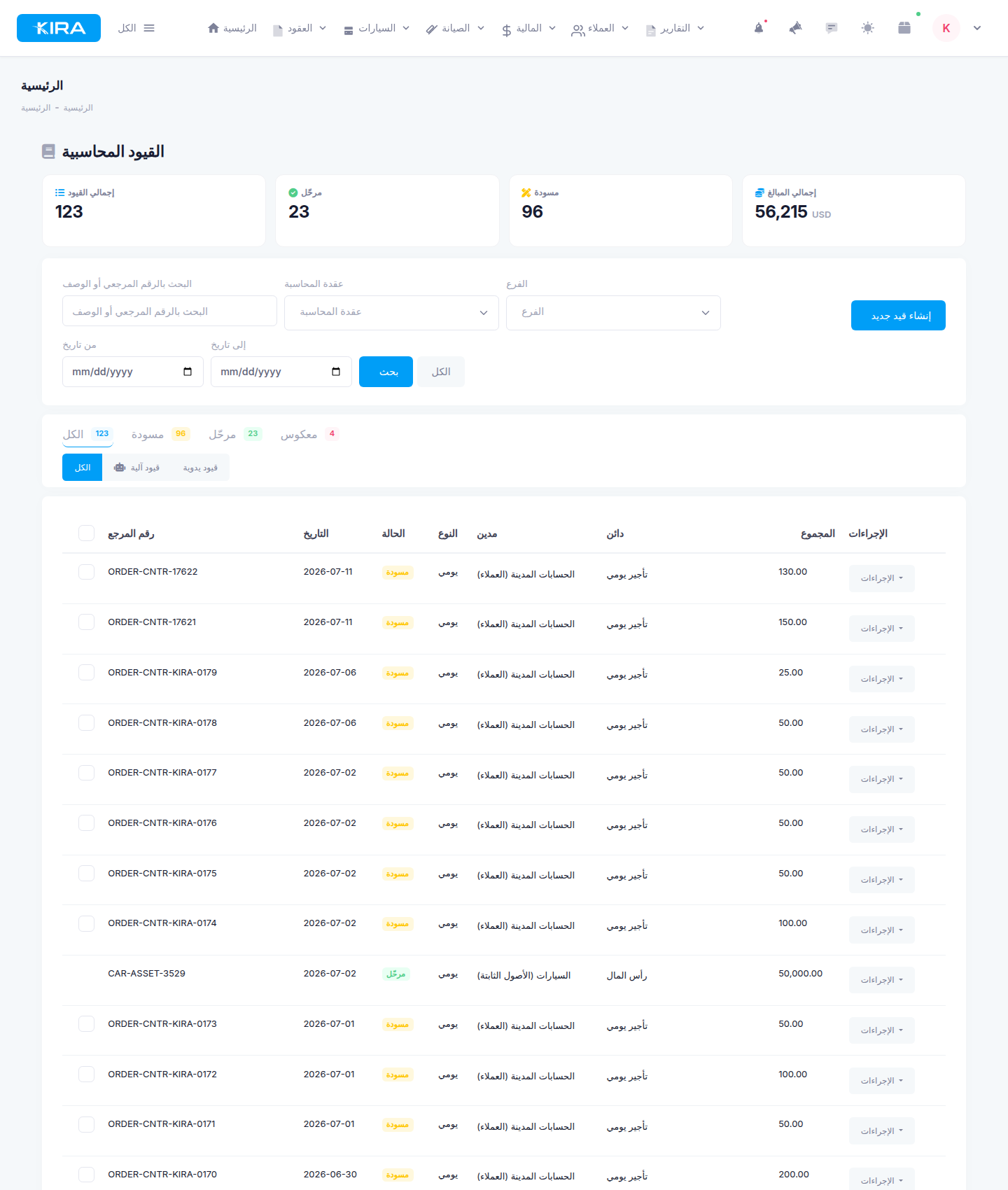
The journal entries page with its indicators and tabs for tracking drafts and posted entries.
Accounting Bridge Settings
The link between your daily operations and your books: it defines how operations — contracts, payments, maintenance, fines, and bank transfers — are turned into journal entries generated automatically on the right accounts.
Financial Reports
- Trial Balance: balances of all accounts to confirm the books are balanced.
- Income Statement: revenue, expenses, and net result for a period.
- Balance Sheet: the financial position — assets vs. liabilities and equity — as of a date.
- Account Statement: the detailed movement of any account with its running balance.
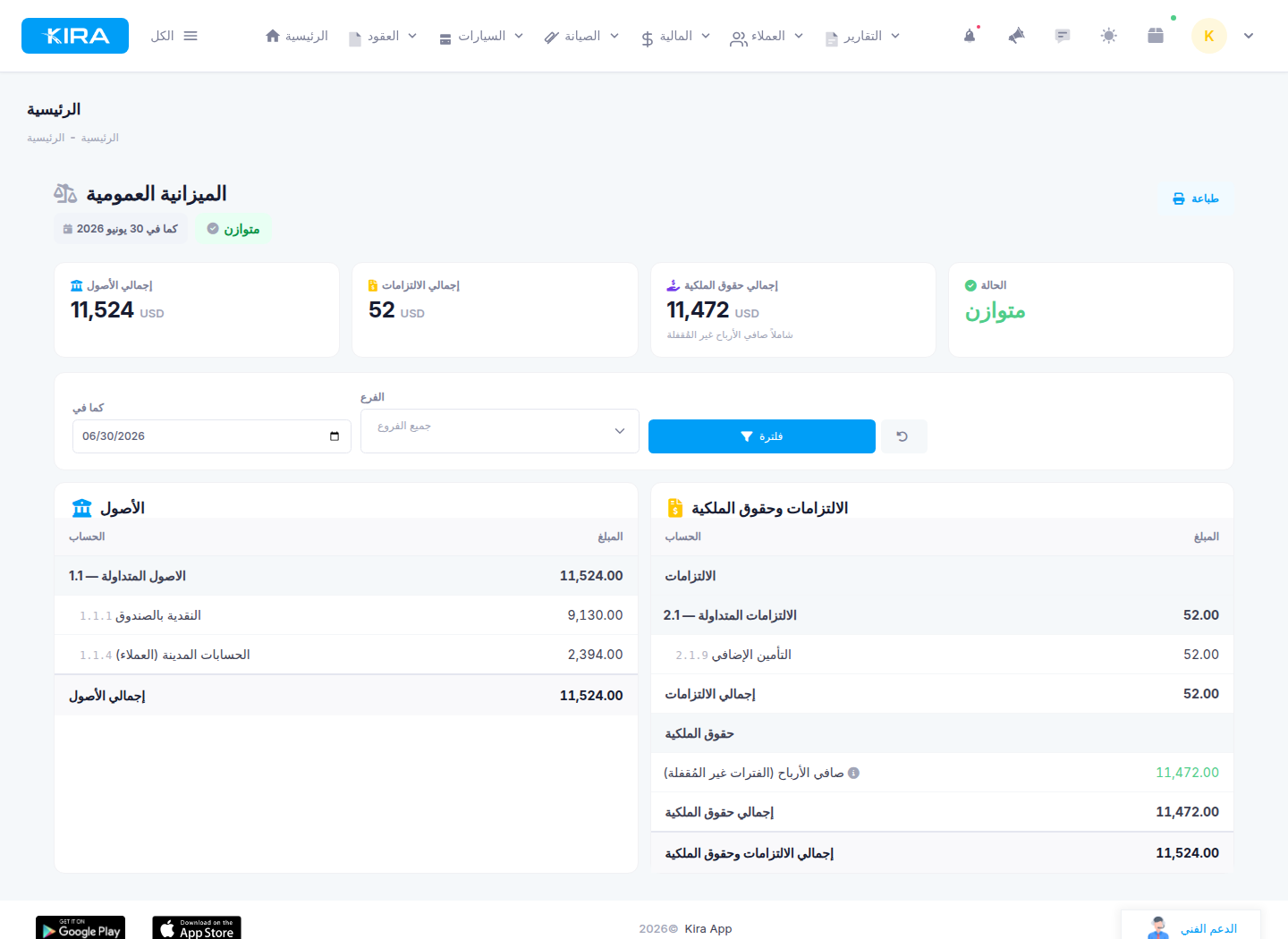
The balance sheet with its "Balanced" badge confirming assets equal liabilities plus equity.
Fiscal Years
Managing your accounting periods: monthly locking to protect closed periods from changes, year-end closing at the end of the fiscal year, and opening balances when migrating to KIRA from another system.
Cost Centers, Assets & Depreciation
The system is completed by cost centers for allocating expenses and revenue to specific departments, branches, or activities, and by assets and depreciation management to track your company's assets and their value over time.
Who Is It For?
- Rental companies that need certified financial statements — for authorities, banks, or partners.
- An in-house accountant or external accounting firm — a full ledger and audit-ready standard reports.
- An owner who wants deeper insight than cash tracking: where do your assets, obligations, and profits really stand?
Practical Steps to Get Started
- Go to Finance ← Advanced Accounting ← Chart of Accounts, review the ready-made car-rental template, and add any custom accounts you need.
- Open Finance ← Advanced Accounting ← Accounting Bridge Settings and configure how entries are generated automatically from your operations.
- Record manual entries from the Journal Entries page, and review automatically generated entries there as well.
- Review entries while in Draft status, confirm they are correct, then post them so they become final and enter the reports.
- Follow your numbers through the trial balance, income statement, balance sheet, and account statement.
Frequently Asked Questions
Can I use Simplified and Advanced Accounting together?
Yes. Simplified remains your quick daily cash-tracking tool, while Advanced builds the ledger and official reports. Using one does not prevent the other.
Do draft entries affect the reports?
No. Reports are built from posted entries only; a draft can stay under review as long as you like without touching your numbers.
I found a mistake in a posted entry — how do I fix it?
A posted entry is final and cannot be edited or deleted. You correct it with a reversing entry, keeping your books' history complete and transparent to any auditor.
Do I need a professional accountant to use the system?
The system speaks the accountants' language and meets their requirements, but the ready-made chart of accounts and automatic entry generation make getting started much easier. If you work with an external accounting firm, they will find everything they need here.
This is the first article in the KIRA Advanced Accounting guide series. Upcoming articles cover each component in detail: the chart of accounts, journal entries, bridge settings, financial reports, fiscal years, cost centers, and assets & depreciation — step by step with practical examples.
Next in the series ➜ Part 2: Getting Started