Fleet Guide 2/7 — Prices and Price Lists
Price your fleet smartly: tiered rates that drop as the rental lengthens (daily · 3-day · 7 · 14 · monthly), grouped into “price lists” you link to dozens of cars at once — with Excel export and import.
🚗 Fleet Guide Series — Part 2 of 7 · Stage: Pricing · Full series index
What you will learn
- Understand price tiers by rental duration.
- Create and manage “price lists” and link them to cars.
- Export and import prices via Excel.
How does KIRA price? Tiers by duration
Each car has five tiers, where the daily rate drops as the rental lengthens:
- Daily rate for the shortest period (the normal daily).
- 3-day rate · 7-day rate · 14-day rate.
- Daily rate for periods over 30 days (monthly).
At contract time the system picks the right tier automatically by the booking length. You enter these prices directly on the car form, or — better — group them into a price list.
Price lists — price once, apply to all
Instead of pricing each car by hand, create a “price list” (e.g. “economy cars”, “luxury cars”) and link every similar car to it. Editing the list updates all its cars at once. Open “Cars → Price lists”: the table shows each list with its five tiers.
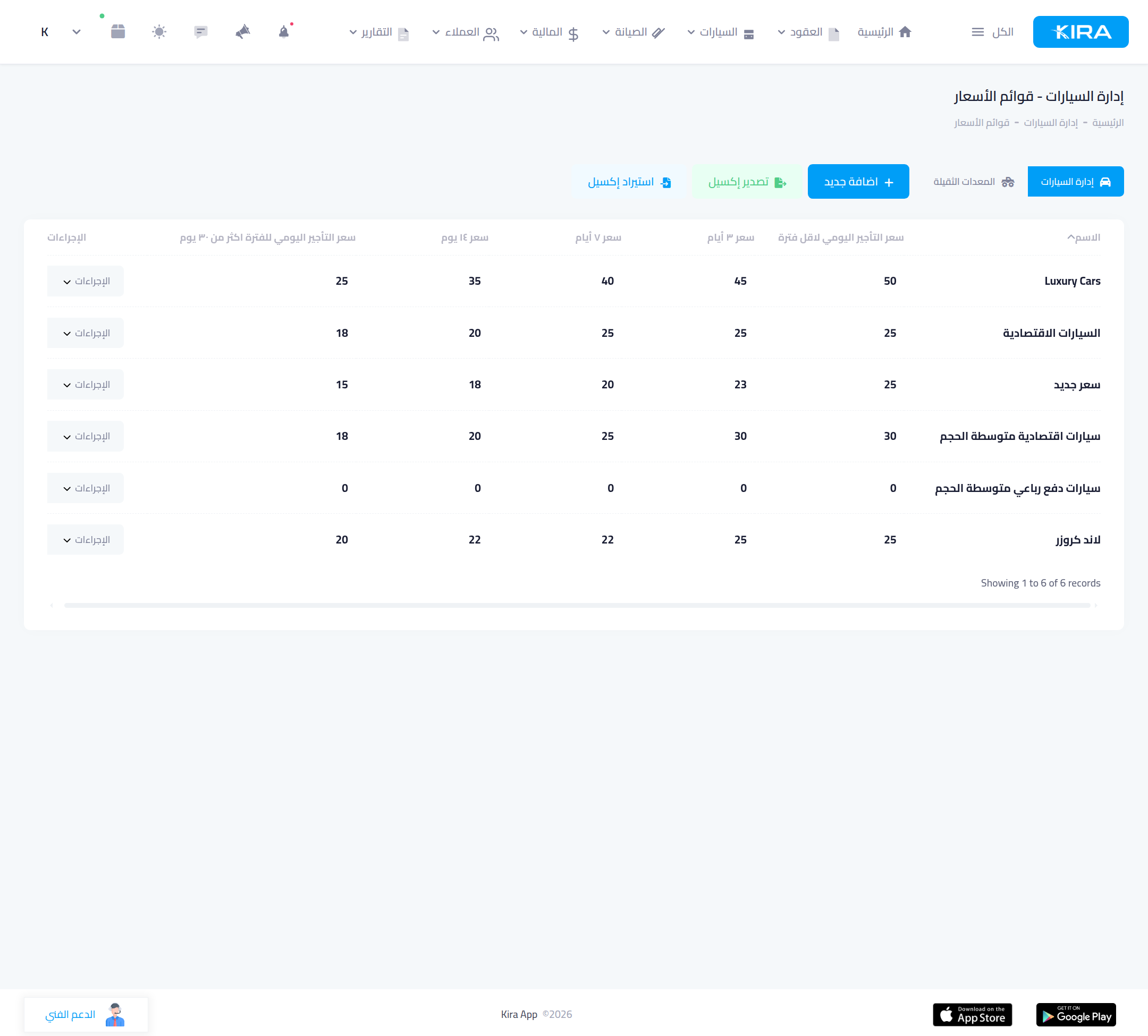
Create a list, or export/import
- “Add new”: create a list with a name and the five tiers.
- “Export to Excel”: download all your lists in one file to edit quickly.
- “Import from Excel”: upload the edited file to update all lists at once — handy for seasonal price changes.
On the car form (part 1) you link the car to a list via the “Price list” field. For a one-off special price on a single car, enter its tiers directly on its form without a list.
Extra prices on the car form
Beside the tiers, the car form carries: third-party insurance, full insurance and cash insurance prices, and the extra-kilometre price (charged when the allowed kilometres are exceeded at return).
Common mistakes
- Empty (0) tiers: a car with no price can't be contracted correctly — make sure the tiers you use are non-zero.
- Pricing every car by hand: painful at update time — use price lists to update dozens in one click.
- Importing Excel with shuffled columns: export first and use the same template so columns line up.
⬅ Next in the series: Part 3: Car Documents: Insurance, Inspection and Tax
Previous: Part 1 — Add a Car (with Automatic Licence Reading) · Series index